IME report drafting software
An IME report draft, structured to your format, before the exam notes go cold.
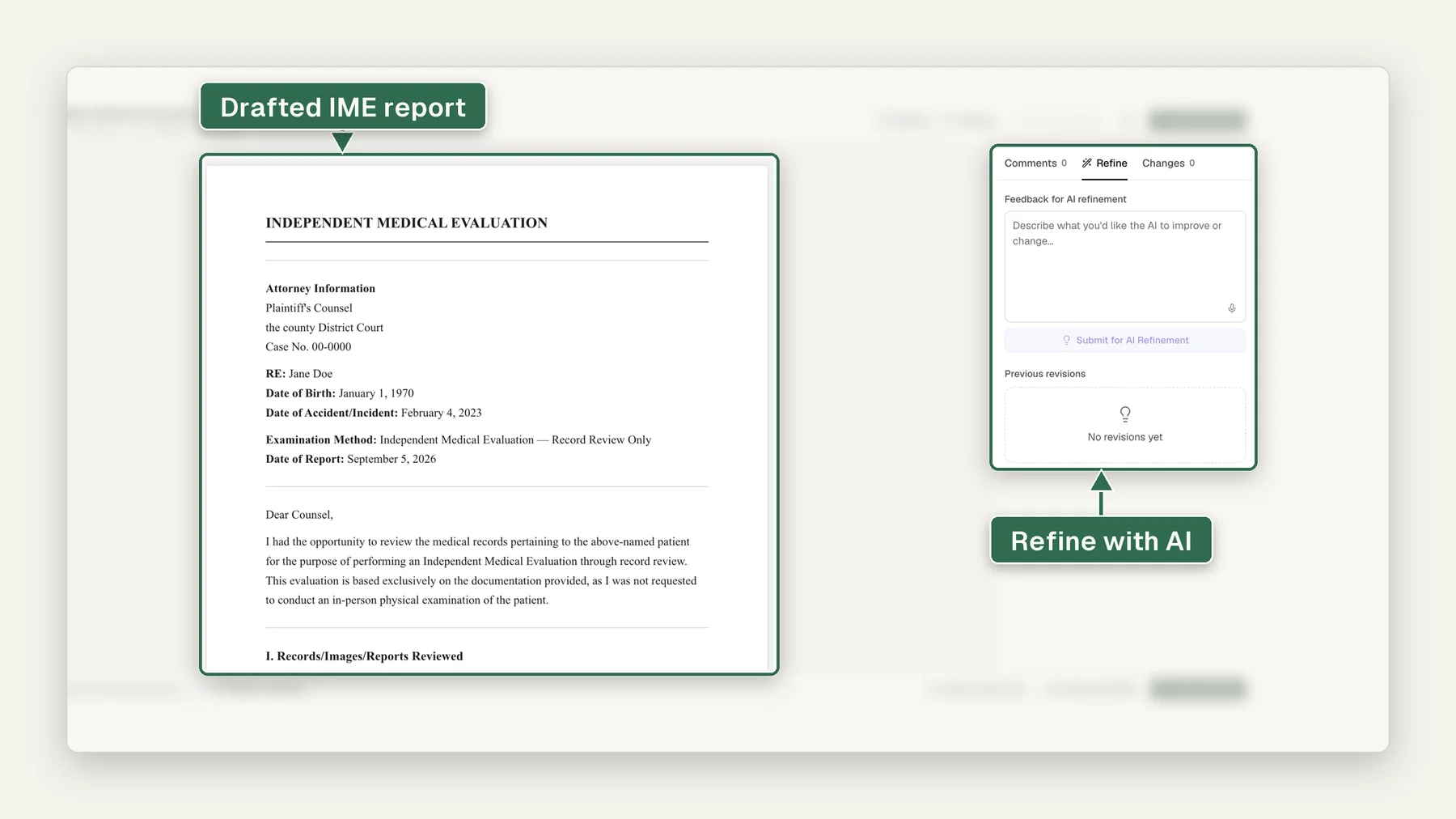
IME report drafting software produces the independent medical examiner's own report draft from exam findings and the case record: jurisdiction-formatted, cited, and ready for the examiner's review before the exam notes go cold. Opinion sections stay blank by design; the AI drafts, and the examiner reviews, finalizes, and signs.
From 10 cents a page, down to 5 cents with volume. Billed per page, not per case.
By Ahmed Jemaa, Co-Founder & CEO of Medrecords AI · Published 10 Jul 2026 · Updated 30 Aug 2026Summarize with ChatGPT, Claude, Perplexity or Google AI
AI drafts; the examiner reviews and finalizes. The report remains the examiner's own work product and signature: the software never authors a medical opinion.
Are the IME report templates jurisdiction-specific?
Yes. Load a state workers' comp format, a carrier-specified structure, or your own template: Medrecords AI fills whichever structure the report must follow. In the Adams fixture case, that's 38 template fields populated into the examiner's own format, headings and all.
Your template, your jurisdiction, your structure.
An independent medical examination report follows a different structure per state, carrier, and referral source. The IME documentation software loads the format the report must follow and fills it: the fixture case populates 38 fields of the examiner's own template, headings included.
Dictate the exam. The draft assembles itself.
The IME report generator pairs with AI Medical Dictation Transcription: a 14-minute dictation becomes about 2,140 words, and each finding lands in the right section of the report: examination, history, records reviewed. The examiner talks through the exam once; the structure handles itself.
The Custom Report Builder engine, in exam clothes.
No secret second pipeline: IME report drafting is built on the same engine as Custom Report Builder, loaded with IME-specific report structures and a second input: the examiner's dictated findings alongside the case record.
Same template mechanics, same citation discipline, one specialized job.
The examiner signs. The software never does.
The draft assembles history, records summary, and documented findings, with every statement dual-cited to a record page or a dictation passage. Opinions, conclusions, and causation are left to the examiner, who reviews, edits, and signs. The result is legally defensible precisely because the work product stays the examiner's own.
See how citations workFrom exam room to signed report.
3 steps: the examiner's judgment stays in every one of them.
The case record is processed and cited before the exam; the examiner dictates findings after it.
History, records summary, and findings land in the chosen template, every line dual-cited.
Opinions written, draft reviewed and edited, report signed: the examiner's work product throughout.
Watch a report draft in your format, then signed
The demo opens on the Report Studio tab of a demo case. Generate opens the Generate New Report window, where the user picks Demand Package Narrative from the report type list and opens the template list, which offers the default template and the user's own personalized one. Next, in Settings, the Personalize from your reports window takes 3 past demand narratives, and Generate Template reads them and composes a template that opens in the template editor. Then the draft opens in the report editor: every sentence carries a numbered citation chip, a selected sentence offers Rewrite with AI, and the user switches the report from Unattested to Attested with a signature. Last, the report row exports to PDF and DOCX, each page marked ATTESTED with the signer and date. Every name, provider and date in the demo is invented.
Transcript
- Pick a report type, then the default template or one of yours.
- Build your own template from 2 to 6 of your past reports.
- The draft comes back cited. You review it, edit it and sign it.
- Export to PDF or DOCX, with your attestation on the page.
Who drafts reports with it.
The software serves the people who own the report.
More exams per week without the evening template-filling: the draft is waiting when the exam ends, and the opinion stays yours.
For evaluatorsFaster turnaround on defensible, dual-cited reports from the examiners you refer to, with the record already processed and citable.
For law firmsWhere it stops
- It drafts the IME report from findings and the record; it never writes the medical opinion, which the examiner writes and signs.
- It reads only the files you upload. It does not request or retrieve records for you.
- It drafts and cites. It does not diagnose, give a medical opinion or sign anything; a qualified reviewer checks the output.
- Each finding cites its source page, so the reviewer can check it against the record.
More questions, answered
Does it handle IME dictation?
Yes: IME narratives are the flagship case. An evaluator dictates exam findings after the appointment, and the transcription comes back structured for the report: history, examination, findings, and opinion sections populated, with template fields mapped. A 14-minute dictation becomes roughly 2,140 words of structured text, mapped to 38 template fields, the same day rather than days later from a transcription service.
How is the output different from a raw transcript dump?
A raw transcript is a wall of text someone still has to reorganize. Here the same context-aware model that structures handwritten records structures the audio: sections are recognized, clinical terms normalized, findings mapped to your template's fields. What comes back is working material (a draft note or report section) not a stenographic blob.
Are the transcriptions cited?
Yes. Every line of structured text carries a timestamp citation back to the moment in the audio it came from, the same way text extracted from a scanned page cites its page number. Click a sentence, hear the source. Unclear audio segments are flagged for review rather than silently guessed.
Does transcribed dictation feed the rest of the platform?
Yes, once transcribed, dictation becomes a first-class source like any document in the case: it is searchable, questionable in Medical Records Chat, and its clinical events can sit on the chronology alongside the rest of the record, each traceable to its audio timestamp.
What audio inputs are supported?
Common audio formats from the ways clinicians actually dictate: phone voice memos, handheld recorder files, and audio exported from dictation apps. Upload the file like any document; the platform routes audio to the transcription engine automatically.
Is this available today?
Yes. Dictation-to-IME Report is live and testable now; we refine it hands-on with early customers, and if your use case is a good fit we'll work with you directly.
Is this a new AI engine or built on existing tools?
It builds on 2 live capabilities already in production, AI Medical Dictation Transcription and IME Report Drafting, rather than a new independent AI judgment.
What happens if the dictation misses a template field?
That field is flagged as missing in the draft rather than left silently blank, so the examiner knows exactly what still needs to be added.
Do you retrieve records from providers?
No. Medrecords AI does not retrieve records from providers or facilities. You bring the records you already have: review starts in minutes from upload. Retrieval vendors take days; you can keep yours and still cut the review to minutes.
How does dictation work?
Upload an audio file of your exam dictation, or paste your typed notes. The transcription is built for medical vocabulary, and the draft pulls from it directly. In the demo case, a 14-minute dictation became 2,140 words of draft, each factual statement tied to the findings or the record.
Can I use my own report template?
Yes. Bring the template your jurisdiction or client requires, and the draft populates it field by field, on your letterhead. In the demo case, 38 template fields were auto-populated from the findings and the record; the opinion fields were left for the examiner.
What happens to the file afterward?
Retention is configurable and deletion is on request, and every access is logged. Your records are handled under a signed BAA and are never used to train any AI model.
What does Medrecords AI do for independent medical evaluators?
It runs the IME workflow end to end: packet building, chronology, progression tracking, and cited drafting, from intake to the signed report.
Will the report come out in my template?
Yes. Send your format during onboarding and it is built into the tool, including your section order, headings and standard language. We will advise on structure, but the call is always yours.
How long does a file take?
Minutes to hours per file depending on size, not days. Files of 10,000 pages and up are read, deduplicated and indexed the same way.
Can I still change everything?
Every line is editable. Page-linked facts: every line shows the page it came from, so checking a draft is faster than checking a colleague’s. Nothing is locked and nothing is final until you sign it.
IME report drafting, answered.
Yes. Load a state workers' comp format, a carrier-specified structure, or your own template: the software fills whichever structure the report must follow. In the Adams fixture case, that's 38 template fields populated into the examiner's own format, headings and all.
Dictate during or right after the exam. The transcription engine converts the audio (a 14-minute dictation becomes roughly 2,140 words) and the drafting engine places each finding into the correct report section: history, examination, review of records. You never copy-paste from a transcript into a template again.
No, and this is a hard line. Opinions, conclusions, and causation determinations belong to the examiner. The software assembles the history, the records summary, and the documented findings into the report structure; the examiner writes the opinion sections, reviews everything, edits, and signs. The report remains the examiner's own work product.
No. It's built on the same engine as Custom Report Builder, loaded with IME-specific templates. Same template mechanics, same citation discipline; the specialization is the report structures and the dual-source drafting from exam findings plus case record.
Every drafted statement traces to one of 2 sources: a page in the case record or a passage in the examiner's own dictated findings. Record facts cite the record; exam facts cite the dictation. When the examiner reviews the draft, each line shows exactly where it came from. Nothing arrives unsourced.
Related capabilities.
The report is the last mile: here's what feeds it.
The parent engine: any report structure, your templates and letterhead.
See report builderThe exam-findings input: dictation transcribed and routed into the draft.
See dictationThe referral packet, sorted and cited before the examiner opens it.
See Packet BuilderSee a report draft built from one of your own files.
Upload a case file and see the drafting engine work, or book a quick demo. Handled under our BAA; never used to train a model.