Medical record summary software
Medical record summaries, cited to the page.
"From record to attested report. Your template, your letterhead."
By Ahmed Jemaa, Co-Founder & CEO of Medrecords AI · Published 8 Jul 2026 · Updated 24 Oct 2026Summarize with ChatGPT, Claude, Perplexity or Google AI
Medical record summary software for IME reports, demand-support summaries, narrative summaries, and chronology deliverables, drafted in a rich-text studio with inline citations and tracked changes. Load your own template, write in your own voice, attest, and export to PDF or DOCX, or push the finished report straight to your CRM.
Is medical records summary software HIPAA compliant?
Medrecords AI is SOC 2 and HIPAA compliant, signs a BAA at signup and offers a DPA. Customer records never train a model, and that promise is contractual, written into the BAA. Access is protected with MFA and per-matter roles, and activity logs can be exported for your own audit trail.
From cited facts to attested report.
PipelineYour format and letterhead, routed by case context.
Every pulled statement carries its page or slice reference.
A rich-text studio with tracked changes and version history.
Sign, then PDF or DOCX, or push straight to your CRM.
The last mile, on your letterhead.
Report templates load automatically from CRM case context: IME formats, demand letters, chronology deliverables. Onboarding recreates the formats you already use.
Every pulled fact carries its page or slice reference into the draft. Keep citations for the internal copy; strip them for the service copy in 1 click.
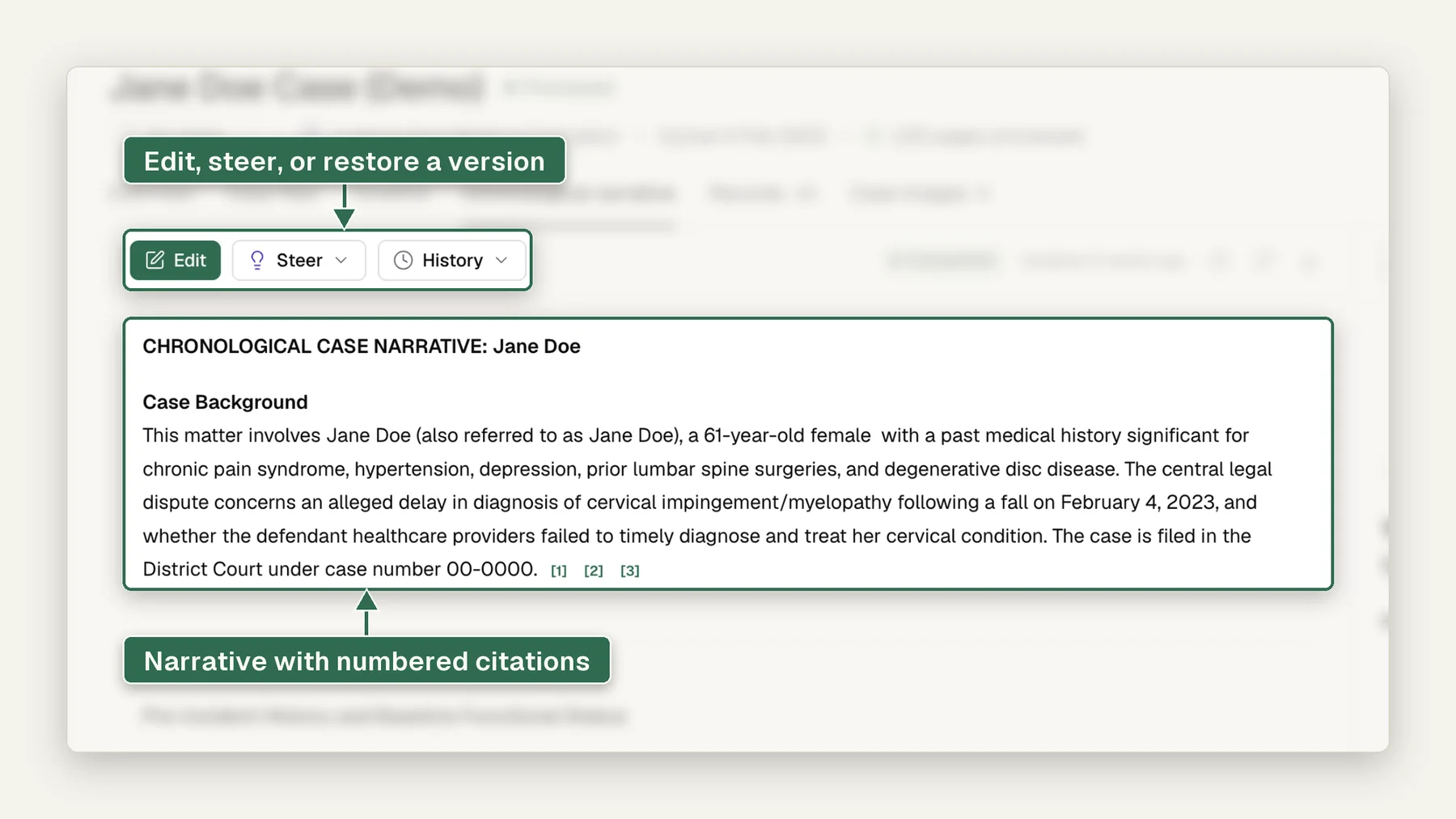
Edit any finding and regenerate. Changes cascade to the timeline and summary, with history preserved for every version.
Reviewers comment, highlight, and resolve in the draft itself. The QA pass happens where the report lives, not in email.
The reviewing professional signs the final work product. AI does the reading. The opinion, and the name on it, are yours.
PDF, DOCX, white-label branding, or push straight to your case-management system through the Connect API and webhooks.
The report spec sheet.
Report Studio™Plus chronology deliverables in any format your templates define.
Built at onboarding; the right one loads from CRM case context.
Page and slice chips in the draft; 1 click to a clean service copy.
Changes, comments, highlights: history preserved end to end.
White-label, on your letterhead, in your voice.
Connect API with token exchange and webhooks, so the report lands in the case file.
Whose reports come out of it.
Different deliverables, same last mile: cited draft in, attested document out.
Evaluator reports in the org's format, days sooner per exam.
For IME orgsYour opinion, your voice, with the citations already in place.
For evaluatorsDemand-support summaries with every dollar figure sourced.
For law firmsConsistent summaries across every claim file, at claim volume.
For workers compMedical records summary software reads a medical file and drafts a short, organized account of it so a professional can act without reading every page. Medrecords AI drafts 4 summary types (narrative, treatment, billing and IME packet) at about 100 pages per minute, with a page citation on every line, from 10¢ per deduplicated page.
- ›Medrecords AI drafts narrative, treatment, billing and IME packet summaries from the same cited case file.
- ›Every output line cites its source page, and every page passes 2-layer machine verification, not a sample.
- ›About 100 pages per minute: a 2,000-page file is summarized in about 20 minutes, before your review.
- ›Self-Service bills 10¢ per deduplicated page, 5¢ per page at volume; a 1,847-page file bills $184.70 and duplicates are never billed.
- ›The software drafts and cites. You review, revise and sign. It does not retrieve records or give opinions.
What does medical records summary software do?
Medical records summary software turns a large, disordered medical file into a summary a busy reader can check in minutes: injuries or conditions, treatment in date order, providers, work status, costs and open questions. In Medrecords AI, each fact in that summary points to the page it came from.
The reader changes; the job stays the same. An attorney values a claim and drafts a demand. An IME or QME physician prepares for an exam and writes the records-review section of the report. A legal nurse consultant builds the work product an attorney relies on. A claims team decides what a file needs next. Each of them must act on a file they did not create, and each must be able to answer "where does it say that?"
A summary and a chronology are different deliverables. The medical chronology lists every dated event in order. The summary picks the facts the question turns on and explains them in plain words. In Medrecords AI both come from the same cited case file, so the summary never says anything the chronology cannot point to.
Why is a medical record summary an evidence problem?
A summary is worth only what someone can verify against the record. A fluent paragraph that cannot point to its page saves reading time once and charges it back at every check: when opposing counsel asks for the source in a deposition, when an IME report is challenged, when an adjuster disputes a figure in a demand.
The law already treats summaries this way. In federal court, Federal Rule of Evidence 1006 lets a party offer a summary of voluminous records, and the party offering it must make the originals available to the other side. A summary with a page citation on every line is built for that check. A summary without one asks the reader to trust it.
That is why Medrecords AI is designed around the evidence first and the prose second:
- Citations are mandatory. Every output line cites its source page, and the citation opens that exact page inside the PDF.
- Verification covers every page. 2 layers of machine verification run on every page, not a sample.
- The file is cleaned before it is summarized. Exact duplicates are removed and co-mingled records belonging to another patient are separated before any summary is drafted.
- Gaps are reported. Missing-records detection lists visits, providers and dates the record implies but does not contain.
- Inference is under your control. When paraphrase is a risk, Extractive Mode quotes the record and cites it, with no rewording.
"I am really loving your platform, the information it pulls (from the medical records) is so clean and it is already so much easier to navigate."
Which summary types can the software draft?
Medrecords AI drafts 4 summary types from the same cited file: narrative, treatment, billing and IME packet. Pick the one your reader needs; the citations and flags are the same in each.
| Summary type | What it answers | Who reads it | Built from |
|---|---|---|---|
| Narrative summary | What happened to this person, told as a story in date order | Attorneys, adjusters, life care planners | The cited chronology, condensed |
| Treatment summary | Which diagnoses, procedures, therapy and medications followed, and when | LNCs, physicians, claims nurses | Diagnoses, visits and medications, each cited |
| Billing summary | What was billed, by provider and date | PI attorneys, lien teams, adjusters | Bills in the production, totaled and cited |
| IME packet summary | What the records-review section of an IME report must cover | IME and QME physicians | The full packet after duplicates and wrong-patient pages are set aside |
Narrative summary
The narrative summary tells the case as plain prose: the history before the incident, the incident and first care, the treatment course, the current status. Each sentence carries a page chip. Use it when the reader wants the story in prose.
Treatment summary
The treatment summary lists diagnoses with the date first recorded and the provider who made them, then visits, procedures, therapy and medications in date order. Start here for standard-of-care and causation questions, because the summary follows the same order an expert uses to answer them.
Billing summary
The medical billing summary totals billed charges by provider and date when bills are in the production. Each line links to the bill it came from, so a demand's specials or a lien review can be checked figure by figure.
IME packet summary
The IME packet summary is written for the evaluator. It covers the records reviewed, prior history, the first clinical contact, imaging, work status and flags, in the physician's template. Paired with dictation to IME report, it becomes the records-review section of a draft report the physician edits and signs.
How does the workflow run from upload to signed summary?
The workflow runs in 6 steps: upload, read, clean, chronology, draft, then flag and hand over. The reading is automatic. The judgment is not.
- Upload what you have. PDFs, faxes, scans, Word files and full DICOM imaging studies go in through the upload portal, SFTP or API. Medrecords AI works from the files you upload; it does not request or retrieve records from providers.
- Read every page. OCR routes each page to the right engine for typed text, tables or handwriting, at about 100 pages per minute. Pages the engine is unsure about are flagged for you instead of guessed.
- Clean the file. Exact duplicates are removed before review and before billing. Wrong-patient pages are quarantined.
- Build the cited chronology. Every dated event lands in the chronology with a link to its source page. This is the base layer every summary type draws from.
- Draft the summary in your format. The draft opens on your template and letterhead, with a citation on every fact. You can ask the file follow-up questions in record Q&A and drop the cited answers into the draft.
- Flag, then hand over. Date gaps, missing expected records, undated pages and conflicts between providers appear as cited flags. You review, revise and sign. The final summary exports to PDF or DOCX with hyperlinks back to each source page, and a 1-click option strips citations for the service copy.
When a supplemental production arrives, you do not start over. The new pages are compared to the existing file, and the software shows what agrees, what conflicts and what is new, so the summary can be updated section by section.
What does a cited summary look like? Our demo case and a short excerpt
A cited summary shows its sources, keeps flags apart from findings and stops short of opinions. Here are the numbers from our demo case, then a short hypothetical excerpt in the format Medrecords AI drafts.
Demo case #IME-4812, "Adams, Timothy, right knee":
- 342 pages arrived in 2 packets.
- 11 exact duplicates were removed, and none was billed.
- 1 wrong-patient page (p.140) was quarantined instead of being summarized into the history.
- 7 visits showing improvement since 4/02 were pulled into 1 cited trend.
- A 14-minute dictation became a 2,140-word draft report with 38 template fields filled.
Example arithmetic: at list rate, those 331 deduplicated pages would bill $33.10.
The excerpt below uses an invented patient, dates and page numbers. It is a hypothetical, not a customer file.
Hypothetical excerpt. Doe, J., rear-end collision, date of loss 01/14/2025. 312 pages from 5 providers reviewed after 41 duplicate pages were removed. Seen in the emergency department the day of the collision for neck pain rated 7/10 (p.3). CT of the cervical spine showed no acute fracture (p.9). Primary care diagnosed cervical strain on 01/21/2025 and referred to physical therapy (p.24). 12 therapy visits followed (pp.31 to 74). Flag: no treatment records between 03/04/2025 and 05/19/2025, 76 days (p.74, p.141). Cervical MRI on 05/22/2025 showed a C5-C6 disc protrusion (p.152).
Look at what the excerpt does not say. It does not say the gap hurts the claim or that the later MRI finding was caused by the collision. Those are judgments for the attorney, the physician or the nurse. The draft puts the evidence in front of them, cited, and stops there. For a full section-by-section template, see the medical record summary example.
What outcome does each reader get?
Each reader gets a summary they can put their name on sooner: the attorney a demand where every figure is sourced, the physician a records-review section in their own template, the LNC a work product with the page references already in place. The outcome that counts is a decision the reader can defend under questioning.
| Reader | Job | Outcome |
|---|---|---|
| Plaintiff attorney | Value the claim and draft the demand | Specials and treatment cited to the bill and the note |
| Defense attorney | Find prior history and gaps | Prior conditions and treatment gaps listed with pages |
| IME or QME physician | Prepare for the exam and write the report | Records-review section drafted in the physician's template |
| Legal nurse consultant | Build the work product an attorney relies on | Treatment summary with every reference in place |
| Claims team | Decide what the file needs next | The same structure on every file, with flags for a nurse or an IME |
See how this fits an IME practice on the IME solutions page.
"...this is the one I'm choosing to go with..."
What should you check before buying medical records summary software?
Check 8 things on a file you already know: citations, duplicates, wrong-patient pages, gap flags, handwriting, inference control, the BAA and the billing basis. Ask for each answer in writing.
- A citation on every fact. Click 10 at random. Each should open the exact source page.
- Duplicates. Repeated pages should be removed before the summary is drafted and before you are billed.
- Wrong-patient pages. Slip in a page from another patient. It should be separated, not summarized.
- Gap and missing-record flags. The software should tell you what is not in the file, with the evidence that implies it should be.
- Handwriting and bad scans. Feed it a handwritten nursing note and a crooked fax, and see whether it reads them or flags them.
- Inference control. Can you switch to verbatim, citation-only output?
- A BAA before the first upload. And a written promise that your records never train a model. Medrecords AI signs the BAA at signup, holds SOC 2, offers a DPA and writes the no-training promise into the BAA. See the HIPAA and BAA page.
- A billing basis you can predict. Know what a 2,000-page file costs before you upload it, and whether duplicates count.
Item 1 matters most. If you have to re-read the record to trust the summary, the software saved you nothing. For how other vendors compare on these checks, see our ranked list of summarization tools.
What does medical records summary software cost?
Medrecords AI Self-Service bills 10¢ per deduplicated page, 5¢ per page at volume, with no subscription, seats or setup fee. Exact duplicates are never billed and credits never expire. A 1,847-page file bills $184.70.
All capabilities come on every plan, including OCR, deduplication, chronology, record Q&A, missing-records detection, summaries, demand packages, IME reports, Bates numbering, redaction, hyperlinked exports and an audit trail. Enterprise On-Prem is an annual license plus a deployment fee, quoted on a call. Security covers MFA, per-matter role access and exportable activity logs. Full detail is on the pricing page.
Who should skip Medrecords AI, and where does another tool fit better?
Skip Medrecords AI if you want a vendor's clinicians to validate the summary, need the records retrieved for you, or want 1 platform that runs the whole personal injury case. Each of those jobs has a tool built for it.
- You want a clinical team to check the summary for you. Medrecords AI sells software, not human review, so your own reviewer signs off. Wisedocs says its medical summaries are validated by its own team with medical backgrounds (Wisedocs medical summaries, as of 2026-10-23). Enlyte sells bodily injury records summarization where a clinical expert validates the final work product (Enlyte medical records summarization, as of 2026-10-23). For a claims team with no nurse on staff, that model fits better.
- You need the records retrieved. Medrecords AI summarizes what you upload and does not request records from providers. Codes Health sells medical record retrieval and announced a retrieval partnership with Filevine (PR Newswire, as of 2026-10-23).
- You want demands, negotiation and the chronology in 1 login. Supio builds chronologies that pin each fact to its source inside a wider plaintiff platform (Supio medical chronologies, as of 2026-10-23). EvenUp offers chronologies with optional professional and nurse review next to its demand products (EvenUp MedChrons, as of 2026-10-23). A high-volume PI firm may prefer that bundle.
- Your files are short and rare. If you summarize a 40-page file 2 times a year, reading it yourself costs about an hour and no software bill. Our estimate assumes a reader who handles about 1 page a minute with notes.
If none of those describes you, the job is reading a large file and defending what it says, which is the job Medrecords AI is built for. Compare more options in our ranked list of summarization tools.
Where does the software stop?
It stops at the opinion. Medrecords AI does not state that an event caused an injury, that care fell below the standard, or that a patient is exaggerating, unless a provider wrote exactly that, and then it quotes and cites the provider.
- It does not retrieve records. The summary covers the files you upload.
- It does not give medical or legal opinions, and it signs nothing.
- It does not score case merit. Demand packages include a benchmark value range, and counsel sets the final number.
- Its flags are signals for a person to weigh. A gap may have an innocent reason.
- It does not guess at unreadable pages. Low-confidence pages are marked for a person to read.
AI does the reading and helps you make the call. The last word is yours.
Bring us your ugliest case. Book a demo and you get access within 1 business day. First case is free on us. Or see pricing first.
Watch a record open on its summary
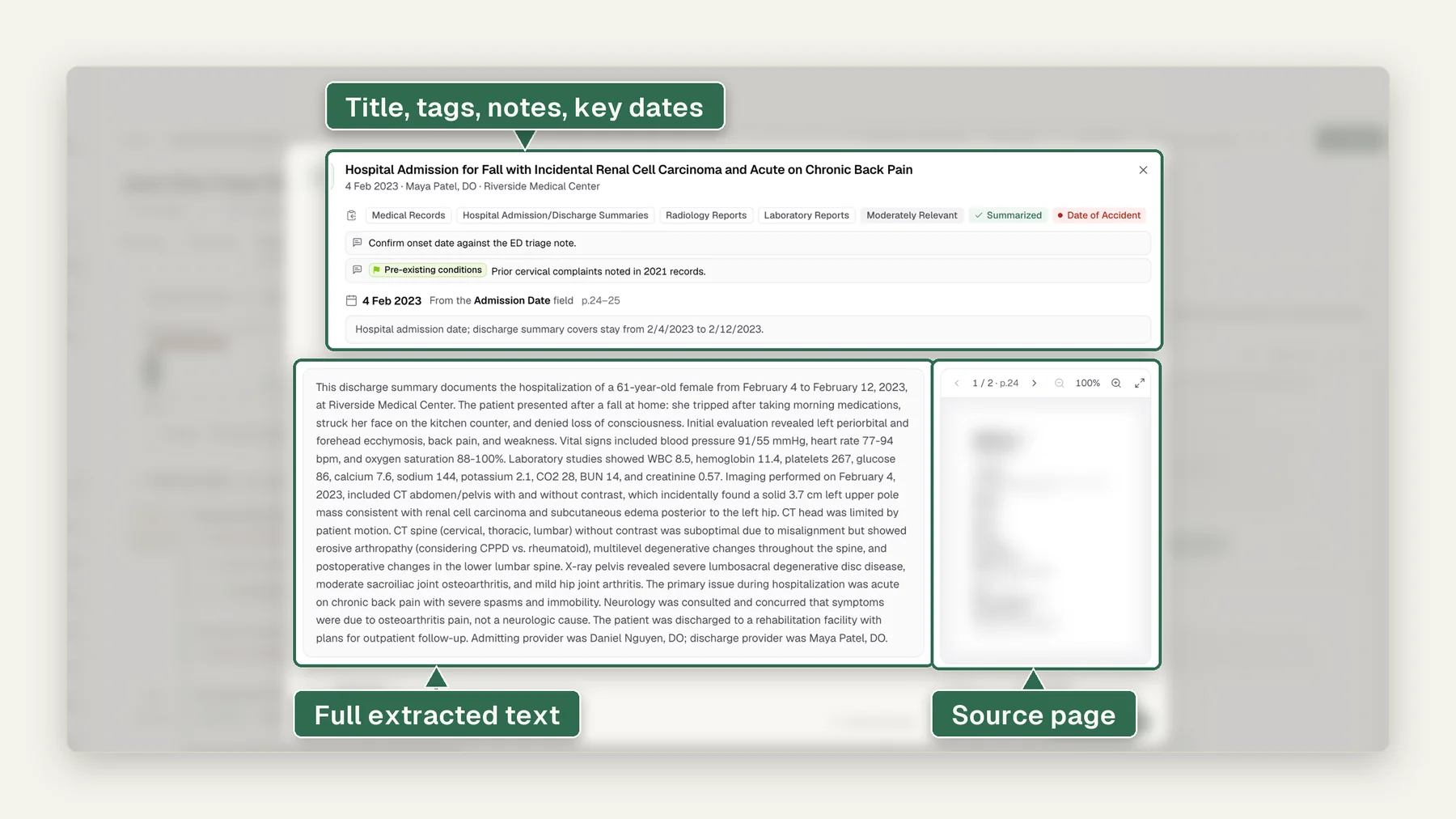
It opens on the Document Index of the demo case Rivera v. Coastline Freight. A click on the MRI cervical spine record from Harbor Point Imaging opens its popup: a descriptive summary first, then cards for the providers named (the author is marked), the treatment rendered, the diagnostic codes as written and the body parts affected. Next, "Providers in this case" lists 5 people found in 41 mentions. Laura Brennan, MD opens to 3 spellings and the reason each was merged, such as "initial matches one person". The confirmation panel then suggests body parts with record counts, and a date of injury of 03/14/2025 stated in 5 records with quoted citations, next to a 1-record outlier you can flag. Last, a steer instruction adds the MRI impression to the narrative, and the change waits in a word diff for review. Every name, provider and date in the demo is invented.
Transcript
- Open a record for its summary, providers, codes and body parts.
- See each provider once, with every spelling and mention count.
- Confirm the injury date and body parts the records state.
- Steer the narrative, then review the changes before you accept.
Watch it as a video page · Download the video (MP4, 20 seconds)
Where it stops
- It drafts cited summaries; it does not retrieve records or give opinions, and you review, revise and sign.
- It reads only the files you upload. It does not request or retrieve records for you.
- It drafts and cites. It does not diagnose, give a medical opinion or sign anything; a qualified reviewer checks the output.
- Each finding cites its source page, so the reviewer can check it against the record.
More questions, answered
Does it write SOAP format or plain narrative?
Both. Same content, 2 registers: SOAP organizes the narrative into Subjective, Objective, Assessment, and Plan per encounter for a clinical reader; plain language tells the same story for a reader without clinical training. Pick per case, or generate both from the same file.
How does a narrative differ from a chronology?
A chronology is a date-ordered table of events, 1 line per event, built to scan. A narrative is prose: it connects those events into the story of the injury and the care that followed. Both are built from the same structured extraction, and both cite to the source page.
Is this a separate product from Medical Summary Reports?
No, and we say so plainly: the narrative is a template variant on the same engine as Medical Summary Reports and the Custom Report Builder, not a new extraction pipeline. The record is read once; the narrative is one more way to write down what it found.
Does the phrasing adapt to the injury type?
Yes. The drafting adapts to the injury profile in the record: an orthopedic knee case reads in orthopedic terms, a brain-injury case leads with cognitive findings. The facts and citations come from the record either way; nothing is invented for style.
Are there citations inside the prose itself?
Every factual sentence carries a page-level citation, inline in the paragraph. Where the record does not support a statement, the narrative does not make it: gaps are flagged for your reviewer, never papered over with prose.
Medical summary reports, answered.
Medical records summary software reads a medical file and drafts a short, organized account of the history, treatment, providers, work status and costs, so a professional can act without reading every page. Medrecords AI drafts narrative, treatment, billing and IME packet summaries with a citation to the source page on every line, at about 100 pages per minute.
A chronology lists every dated event in order with its source page. A summary picks the facts a specific question turns on and explains them in plain words. A good summary sits on top of a chronology. In Medrecords AI both come from the same cited case file, so every summary statement traces back through the chronology to a page.
Yes. Summaries draft on your template and letterhead, and export to PDF or DOCX with hyperlinks back to each source page. A 1-click option strips the citations for the copy you serve while keeping them in your internal version. IME physicians can pair the IME packet summary with dictation to produce a draft report in their own format.
Yes. Every summary is a draft for you to edit, and you can open the source page beside any line to check it before you change it. You review, revise and sign. Medrecords AI signs nothing and does not give medical or legal opinions.
Accuracy you can check matters more than accuracy you are promised. Every Medrecords AI output line cites its source page, and every page passes 2-layer machine verification, not a sample. Low-confidence pages are flagged for a person instead of guessed. The fastest test is to run a file you already summarized by hand and click 10 citations.
Medrecords AI is SOC 2 and HIPAA compliant, signs a BAA at signup and offers a DPA. Customer records never train a model, and that promise is contractual, written into the BAA. Access is protected with MFA and per-matter roles, and activity logs can be exported for your own audit trail.
On Self-Service, a 2,000-page file with no duplicates bills $200 at 10¢ per page. The rate drops to 5¢ per page at volume, which matters for high-volume teams, not a single file. Exact duplicates are never billed, so a file with 150 duplicate pages bills for 1,850 pages, or $185 at 10¢. There is no subscription, seat fee or setup fee, and credits never expire.
Sources and method
Vendor prices and features below come from public pages captured on the dates shown. Vendors change pricing often, so confirm before you buy.
- Federal Rule of Evidence 1006, Summaries to prove content (Cornell Legal Information Institute)
- Wisedocs medical summaries (captured 2026-10-23)
- Enlyte medical records summarization (captured 2026-10-23)
- Filevine partners with Codes Health on medical record retrieval, PR Newswire (captured 2026-10-23)
- Supio medical chronologies (captured 2026-10-23)
- EvenUp MedChrons product page (captured 2026-10-23)
- Medrecords AI pricing
- Medrecords AI HIPAA and BAA
Your next report, days sooner.
Bring your template to the demo and see a cited draft land in it. Handled under our BAA; never used to train a model.