Medical Chronology
AI medical chronology software that cites every entry.
Medical chronology software from Medrecords AI turns 10,000+ pages of unstructured records into a structured, searchable, cited chronology. Every event is synced to the exact source page or DICOM slice it came from, so a decade of care can be reviewed at a glance and every entry checked against its source.
By Ahmed Jemaa, Co-Founder & CEO of Medrecords AI · Published 8 Jul 2026 · Updated 24 Oct 2026Summarize with ChatGPT, Claude, Perplexity or Google AI
How much does medical chronology software cost?
Medrecords AI bills 10¢ per deduplicated page on Self-Service, down to 5¢ at volume. A 2,000-page file costs $200 at list. There is no subscription, seat fee or setup fee, exact duplicates are never billed, and credits never expire. Other vendors price per page, per case or per month, and many do not publish a number, so compare on the same file.
Upload records at any scale.
Drop tens or thousands of documents at once: PDFs, faxes, JPEGs, TIFs, Word files, and full DICOM studies. Each page is segmented, OCR-routed to the right engine, and quality-flagged. No manual sorting.
A structured list of events, at a glance.
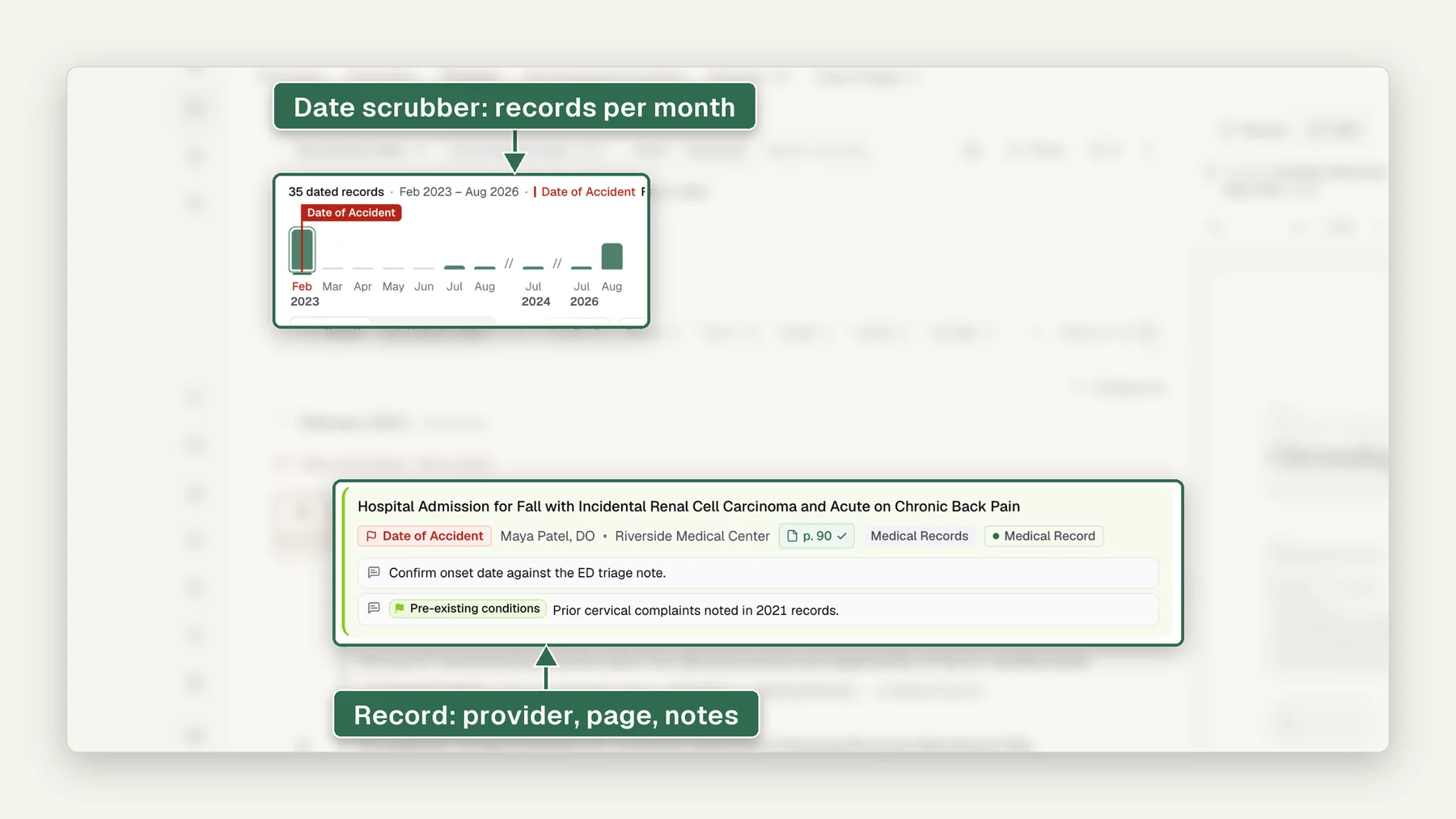
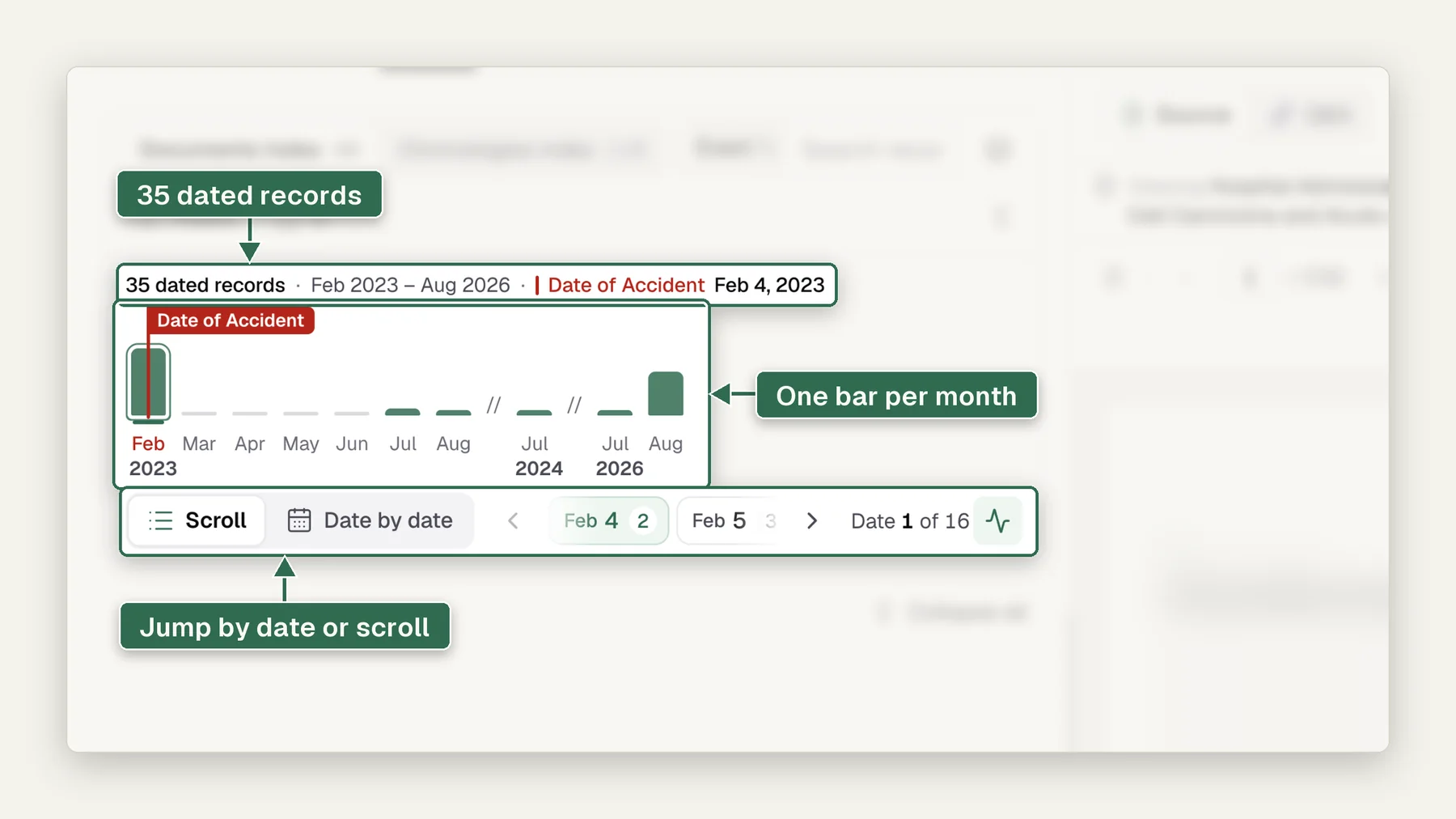
Every clinical event (diagnoses, treatments, providers, imaging) extracted into a color-coded, sortable index. Spot gaps in care, missing procedures, or inconsistent histories instantly across the whole file.
Searchable, indexed, and cited.
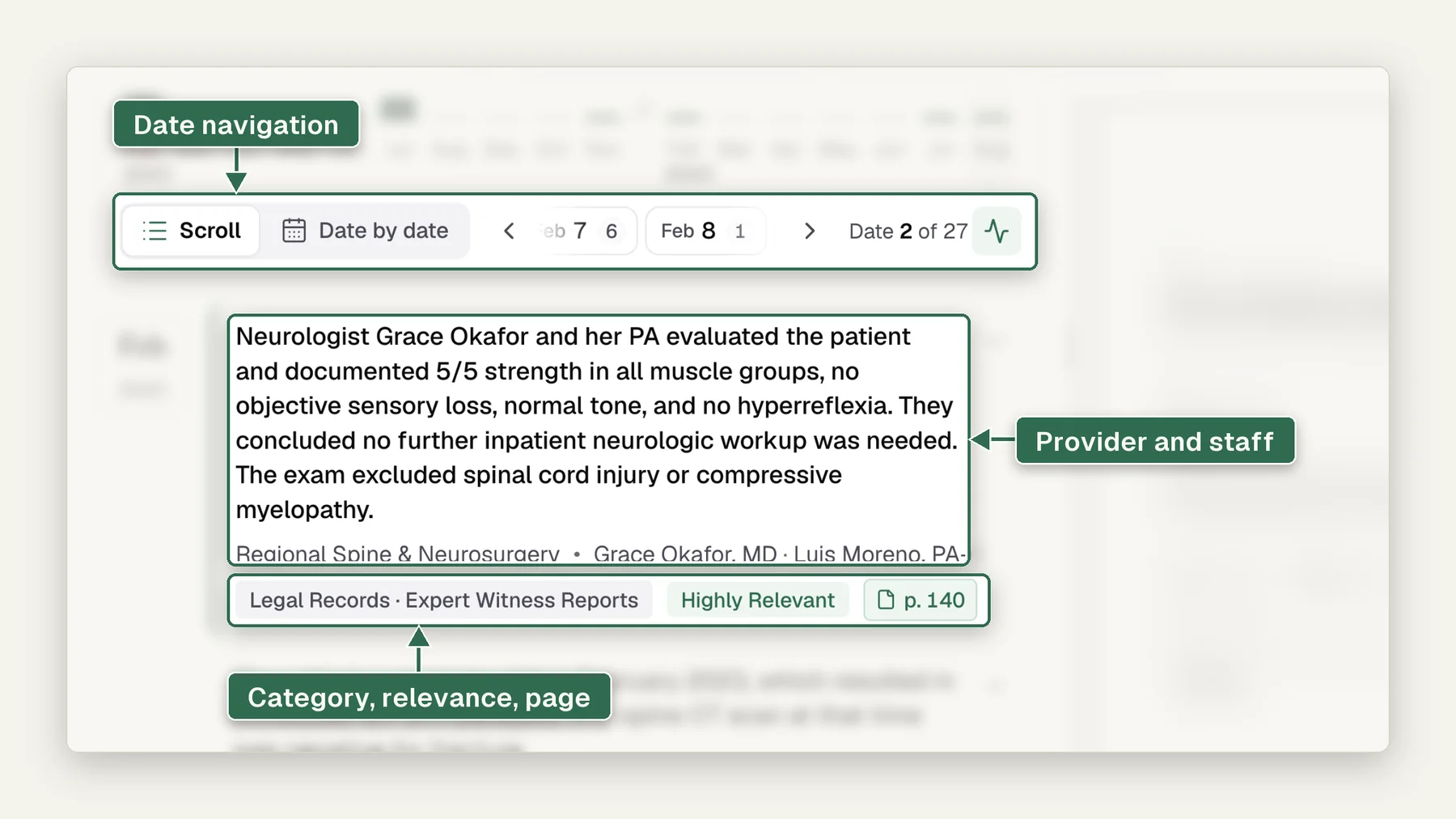
Every document in the packet is tagged with its date, title, and author, and hyperlinked to the exact source page. Search a diagnosis, medication, or provider and jump straight to the record, with the citation attached.
Imaging on the timeline, next to the report.
DICOM studies are ingested, viewable in an integrated PACS viewer, and placed inline on the chronology, so the MRI or CT sits next to the note that ordered it. The one capability generic tools can't reproduce.
See Medical Imaging ReviewFrom records dump to defensible timeline.
4 steps and no manual sorting, for a case, a claim or an exam.
Drag & drop records, claims files, and legal docs. No manual sorting required.
Sorted by date, provider, and type, with duplicates removed automatically.
A timeline and summary, every line traced to its source, cutting prep time.
Share reports or push to your CRM. Always traceable, always consistent.
Watch a case go from upload to chronology.
In this 20-second walkthrough, a demo case goes from a stack of PDFs to a finished chronology. 4 files, 936 pages in all, are dropped into a new case. Medrecords AI runs every file through 6 steps: deduplication, content extraction, source file separation, document classification, summarization and vector processing. The events then land in date order, each one tied to the page it came from, so the MRI finding on page 132 opens with the line it was read from. The last view puts the whole case on 1 timeline by month, split into medical records, images and DICOM studies, with the date of injury marked. Every name, provider and date in the demo is invented.
Transcript
- Drop in the records: PDF, Word, DICOM or images, in any order.
- Every file is deduplicated, read, split into documents and summarized.
- Events land in date order, each tied to the page it came from.
- The whole case on 1 timeline, by month and record type.
Watch it as a video page · Adding late records to a finished case (video) · Download the video (MP4, 20 seconds)
Who builds chronologies with it.
Same timeline, different lens: each team reads the record for what decides their file.
Date of loss to demand, with the prior-injury history already surfaced.
For PI firmsTreatment gaps and work-status changes, visible per claim at volume.
For workers compThe sort-and-index hours gone; the clinical analysis hours kept.
For LNCsEvaluators walk into the exam with the whole history on 1 page.
For IME orgsRelated features.
The chronology gets sharper with these: same timeline, more of it filled in for you.
Suggests the likely date of injury with source citations, so you confirm it instead of hunting for it.
See howGroups and counts how often each body part or injury is referenced on the timeline, surfacing where the case actually lives.
See howUpload new records mid-case and the chronology re-sorts and regenerates on its own. No manual re-run.
See howInclude or exclude whole categories (legal records, nursing notes) from the chronology with one toggle, not a re-run.
See howMedical chronology software reads a set of medical records and drafts a date-ordered timeline of every clinical event, with each entry cited to its source page. Medrecords AI reads about 100 pages a minute, removes and logs duplicates, flags missing records, and bills 10¢ per deduplicated page down to 5¢ at volume.
- ›Every row in a Medrecords AI chronology cites its source page, or the DICOM slice for imaging, so a reviewer checks a line in 1 click instead of searching a 3,000-page file.
- ›The software takes the reading, deduplication, dating and first-pass rows. A 2,000-page file drafts in about 20 minutes. Your team spends its hours checking and deciding.
- ›In our 342-page demo case, the software removed 11 duplicate pages and quarantined 1 wrong-patient page (p.140). At the 10¢ list rate the bill is 342 - 11 = 331 pages x $0.10 = $33.10.
- ›There is no page cap, subscription, seat fee or setup fee. Exact duplicates are never billed and credits never expire. All capabilities come on every plan.
- ›The software drafts and cites. It does not retrieve records, give medical or legal opinions, score case merit or sign anything. You review, revise and sign.
What is medical chronology software?
Medical chronology software turns an unsorted pile of medical records into a dated, cited timeline of visits, diagnoses, procedures, medications, imaging and work-status changes. Each entry names the provider and cites the exact page it came from, so the person who relies on it can check any line in seconds.
The chronology is the working document of a medical-legal file, and it gets used under pressure: an expert defends it at deposition, an examiner signs a report built on it, a demand cites it to an adjuster. That makes a chronology an evidence problem, not a summarization problem. The chronology records what the chart says and when, and leaves causation and standard of care to the people who sign the report. If you want the format first, read what a medical chronology is or how to write a medical chronology by hand.
Why a chat window is the wrong tool
General chat tools will summarize a PDF you paste in. For a chronology they fail on 3 counts. They cap file size far below a real production, and a litigation file of 10,000+ pages is ordinary. They answer in prose, without page citations you can click. And they cannot tell that page 212 and page 1,904 are the same visit note, faxed twice. Medical chronology software is built around those 3 problems: scale, citation and duplicates.
Features: what does medical chronology software do?
Medrecords AI reads every page and image, removes duplicates, separates co-mingled patients, dates every encounter, and builds a timeline where each row opens its source page. It flags what the file does not show: missing records, undated pages, gaps in care and near-duplicate pages that differ.
| Feature | What it does | Why it matters on a real file |
|---|---|---|
| Page citations | Every row links to its source page or DICOM slice | Cross-checks take 1 click; FRE 1006 summaries need the originals at hand |
| OCR and handwriting | Routes each page to the right engine; flags low-confidence pages | Bad faxes get flagged for a person, never silently guessed |
| Deduplication | Keeps 1 copy of each repeated page and logs removals | You read and pay for each page once |
| Co-mingled records detection | Separates fused PDFs and sets wrong-patient pages aside | Another patient's note never lands on your timeline |
| Undated document flagging | Puts pages with no readable date in a review bucket | A guessed date in a chronology looks like evidence |
| Key date auto-suggestion | Proposes the likely date of injury with its citations | You confirm the date instead of hunting for it |
| Missing records identification | Lists visits, providers and dates the file refers to but lacks | Your next records request is drafted for you |
| Record alteration detection | Shows near-duplicate pages that differ side by side | A changed line is a prompt to look, not a verdict |
| Imaging | Places DICOM studies on the timeline with an integrated PACS viewer | The MRI sits next to the note that ordered it |
| Reasoning modes | Sets how much the AI may infer; Extractive Mode returns citation-only rows | Exhibits get rows with zero inference |
| Hyperlinked exports | DOCX and HTML where every cite stays a live link | Experts and co-counsel can check cites outside the platform |
| Live record updates | Re-sorts the timeline when new records arrive | Supplemental productions do not mean a re-run |
Under every feature sits 2-layer machine verification on every page. The citation is what lets a person check the machine.
"You pretty much already solved the hardest problem for me, which is the medical records review... making a chronology, because that's by far the most important thing, and it's the most time-consuming thing."
Workflow: how does a file go from upload to export?
Medrecords AI turns an upload into a cited chronology in 7 steps, and you can stop and check the work at any of them. The reading takes minutes. The review is where your team's time goes, and the product is built so that review is fast.
- Upload the file as it came. PDFs, faxes, JPEGs, TIFs, Word files and full DICOM studies, in 1 batch, through the upload portal, SFTP or API. Nothing needs pre-sorting, and there is no page cap.
- Read every page. OCR routes typed text, handwriting and tables to the engine that fits. Pages it cannot read with confidence are flagged for a person.
- Remove duplicates and split fused documents. Exact duplicates are removed, logged and never billed. Wrong-patient pages are quarantined.
- Date every encounter. Each document gets a date of service, provider, facility and type. Undated pages go to a review bucket.
- Build the timeline. Events land in date order, each cited to its page or slice.
- Flag what the file does not show. Missing records, treatment gaps, inconsistent histories and near-duplicate pages that differ, each flag cited to its evidence.
- Review, then export. Open any row, check it against its page, correct or annotate it, then export to hyperlinked DOCX or HTML with Bates numbers that stay stable through re-sorting.
When a new production arrives, the timeline re-sorts and supplemental record review shows where the new pages agree, conflict or add. The same cited timeline feeds summaries, narrative summaries and questions answered from the record, so a fix in 1 row carries through. For large scanned files, see our guide to a verified chronology from scanned records.
Worked example: the Adams demo case
The Adams demo case shows the path on a real-sized file. Case #IME-4812, "Adams, Timothy, right knee", is a demo case: 342 pages in 2 packets, 11 duplicates removed, and 1 wrong-patient page (p.140) quarantined.
The middle column holds the demo case facts. The right column is what a reviewer would do with each one; it describes a review, not something that happened in the demo.
| Step | Demo case fact | What a reviewer would do |
|---|---|---|
| Upload | 342 pages in 2 packets | Confirm both packets are the full production |
| Deduplicate | 11 duplicate pages removed | Open the removal log and confirm each one |
| Wrong-patient check | p.140 quarantined | Confirm the page is not the client's and keep it out |
| Trend | 7 visits showing improvement since 4/02 | Read the cited notes before relying on the trend |
| Dictation | The examiner's 14-minute dictation became a 2,140-word draft, 38 template fields filled | Revise the draft and sign the report |
At the 10¢ list rate the file bills 342 - 11 = 331 pages x $0.10 = $33.10. The 11 duplicates cost nothing. At 100 pages a minute, reading 342 pages takes about 3.4 minutes. The wrong-patient page at p.140 is the detail we would point a buyer to: a merged page from another patient is the kind of error that ends up in a motion, and catching it is a job for software that reads every page, followed by a person who confirms it.
The examiner side of this case is covered on IME report drafting. For the chronology, the point is simpler: every row an examiner relies on should open its page, because that row is what the examiner will be asked about on cross.
"The missing records page and the way you visually made the duplication clear (duplicate pages flagged across files) is very useful."
Job: who uses medical chronology software, and for what?
Law firms, legal nurse consultants, IME and QME examiners, insurers and TPAs, and life care planners all use the same cited timeline, each for a different question. The table shows the job each team hires the chronology for.
| Team | The job | What they read first |
|---|---|---|
| Personal injury firms | Date of loss to demand, with prior injuries surfaced | Treatment gaps, prior history of the same body part |
| Medical malpractice firms | What was known, when, and what happened next | Minute-level rows, late-entry labels, missing records |
| Legal nurse consultants | Hand off sort-and-index hours, keep the analysis hours | Draft rows to review, flags to analyze |
| IME organizations | The whole history on 1 page before the exam | Prior complaints, imaging, work status |
| Workers comp | Treatment and work-status changes per claim, at volume | Gaps and work-status changes |
| Life care planners | Every diagnosis and recommendation for future care, dated | Recommendations and providers |
Most teams also want a short summary for the reader who will never open the records. Both come from the same cited source; see chronologies and summaries. For a step-by-step nurse workflow, read how legal nurse consultants build a medical chronology. For malpractice files, read AI medical chronology for med mal cases.
Outcome: what changes in time and cost?
The draft takes minutes instead of days, and the cost is a published per-page rate instead of staff hours or a quoted fee. What does not change is the step that matters most: your team checks the timeline and signs what goes out.
| Approach | Turnaround | Cost basis | Citations | Who signs |
|---|---|---|---|---|
| Manual, in-house | Days for a large file | Staff hours at your own rates | Typed by hand | Your in-house staff |
| Outsourced chronology service | Days, by quote | Hourly or per file, often not published | Varies by service | The service's reviewer |
| Per-case AI tool | Minutes to hours, by vendor | Flat fee per case; published fees run about $39 to $299 a case (as of 2026-10-23) | Varies by vendor | You |
| Medrecords AI | About 100 pages a minute to a cited draft; hours to a verified one | 10¢ per deduplicated page, 5¢ at volume; duplicates never billed | Every entry linked to its page or DICOM slice | You; the software signs nothing |
The per-case range comes from 2 captured sources: Chronos case packs at $39 to $49 a case, as reported in Superinsight's pricing guide, and Legalyze's $199 a case through Nov 30, 2026 ($299 regular). At 10¢ a page, per-page billing costs less than a $39 to $49 case pack only below about 390 to 490 pages, and less than a $199 to $299 case fee below about 1,990 to 2,990 pages. Above those sizes, the flat fee costs less. Some worked numbers at the 10¢ list rate (5¢ at volume):
- Adams demo case: 342 pages uploaded, 331 billed x $0.10 = $33.10.
- Surgical admission: 1,847 pages x $0.10 = $184.70.
- Mid-size PI file: 2,000 pages x $0.10 = $200, about 20 minutes to draft. That roughly ties Legalyze's $199 sale price and costs more than a Chronos case pack.
There is no subscription, no seat fee and no setup fee, and credits never expire. Enterprise On-Prem is available as an annual license plus a deployment fee for teams that need it inside their own walls. Published pricing is rare in this market: our pricing report checked 120 vendors and found 21 publish a price and 7 publish a per-page rate. Full rates are on the pricing page, and a vendor-by-vendor comparison is in medical chronology software for attorneys.
When a chronology service is the better choice
Services still win in 2 cases. If you need a signed clinical opinion, such as an IME report or a peer review, a licensed professional has to write it. And if you handle a handful of files a year, a service can be less overhead than learning any tool. Our list of medical chronology services compares them. Before you sign with one, use our checklist for choosing a medical chronology service.
What should you check before you buy chronology software?
Check 3 things on your own file first: every entry opens its source page, the tool flags pages it cannot read, and the vendor signs a BAA before your first upload. Those 3 rule most tools in or out in 1 afternoon.
- Citations open the exact page. Click 10 random rows.
- Bad scans get flagged. Upload your worst fax and a handwritten note. A tool that never flags a page is guessing somewhere.
- Duplicates are removed and not billed. Ask both questions.
- Dates of service, not document dates. Undated pages should be set aside, not guessed into place.
- A BAA before the first upload. HIPAA lets a covered entity share PHI with a business associate only under a written agreement (45 CFR 164.502(e)). Medrecords AI signs the BAA at signup; see the HIPAA page.
- A SOC 2 report, not a badge. SOC reports are issued by CPA firms under AICPA standards. Medrecords AI shares its evidence summary under NDA through the security page.
- Retention and training terms in writing. Per its security page, Medrecords AI processes customer content in the US only. At termination, PHI is returned within a 30-day export window and then destroyed. Customer records never train a model, and that term is in the BAA.
- Exports that keep the links. Ask for DOCX or HTML where each cite is still live.
- An activity log. Look for per-matter roles, MFA and an exportable log of who viewed and changed what, like our audit trail and chain-of-custody log.
What Medrecords AI does not do
Medrecords AI builds cited chronologies and summaries from files you upload. It does not decide causation, standard of care or what a gap means, and a tool that labels a flag as a finding is claiming more than it can back up. AI does the reading and helps you make the call. The last word is yours.
Specifically, Medrecords AI does not:
- retrieve records from providers; you bring the file
- parse hospital EHR audit logs (its audit trail is its own log of access to and edits of your uploaded file)
- count consents
- build Bates crosswalks between separate productions
- accept a reference library upload
- give medical or legal opinions
- sign anything
When a chronology goes to court as a summary, federal courts apply Federal Rule of Evidence 1006, amended effective December 1, 2024: the court may admit a summary of voluminous records, and the originals must be available to the other side. A chronology where every row opens its source page makes that check fast. The citations and the person who checked them make a chronology defensible. The tool alone does not.
Which setup fits which team?
Draft in-house with software and send out only the piece that needs a signature. That is the setup we would pick for any team with steady volume. The plan is the same for everyone: all capabilities on every plan, billed per deduplicated page.
- Small PI or med mal firm: Self-Service, per page, with a paralegal or nurse reviewing cited rows.
- LNC practice: Self-Service, with the analysis and cite check kept in-house and the software cost passed through per file.
- IME organization or carrier: 10¢ a page, 5¢ at volume, SFTP or API intake, per-matter roles.
- Security-restricted enterprise: Enterprise On-Prem, annual license plus deployment fee.
Access comes within 1 business day after the demo. Bring us your ugliest case. Book a demo. First case is free on us. See pricing.
More questions, answered
How are late-arriving medical records handled?
A supplemental batch is treated as a comparison problem, not a new pile. It is deduplicated against everything already produced, summarized on its own, and each genuinely-new record is flagged for whether it agrees with, conflicts with, or adds to the existing file.
How do new records get compared to the existing file?
Each new record's extracted content (dates, findings, work status, diagnoses) is checked against the file's existing analysis. Corroboration is flagged as agreement; contradictions are flagged as conflicts with the specific disagreeing content quoted and cited.
How are conflicts with the prior report flagged?
If a new record contradicts something a previously drafted report relied on, that report is flagged for update, with the conflicting passage cited on both sides. The reviewer decides what changes; nothing is rewritten silently.
Is deduplication run against the full production or just the batch?
The full production. Supplemental batches routinely re-send pages from earlier productions, so matching only within the batch would miss most duplicates. Anything already in the file is removed and logged before review begins.
Are both sides of a conflict cited?
Yes. Every conflict flag carries 2 citations (the original page and the supplemental page) so the disagreement can be verified at both sources in 1 click each.
Can I get my own column layout?
Yes. Send the format you already deliver during onboarding and it is built into the tool, column order and date format included. We will advise on structure, but the call is yours.
How are undated documents handled?
Flagged, never guessed. An undated page is carried as its own flagged row so you place it yourself rather than discovering later that software placed it for you.
Do you retrieve records from providers?
No. Medrecords AI does not retrieve records from providers or facilities. You bring the records you already have: review starts in minutes from upload. Retrieval vendors take days; you can keep yours and still cut the review to minutes.
Does it read handwriting?
Yes. Handwritten notes, nursing flow sheets and intake forms are extracted alongside typed pages, and anything unreadable is flagged rather than silently dropped.
Medical chronology, answered.
Medical chronology software reads medical records and drafts a date-ordered timeline of clinical events: visits, diagnoses, procedures, medications, imaging and gaps. Good software cites every entry to its source page, removes duplicates and flags pages it cannot read. Medrecords AI reads about 100 pages a minute and links every row to its page or DICOM slice, so a reviewer can check any line in 1 click.
Medrecords AI bills 10¢ per deduplicated page on Self-Service, down to 5¢ at volume. A 2,000-page file costs $200 at list. There is no subscription, seat fee or setup fee, exact duplicates are never billed, and credits never expire. Other vendors price per page, per case or per month, and many do not publish a number, so compare on the same file.
No. Medrecords AI has no page cap, and files of 10,000+ pages run the same way as a 300-page one, along with full DICOM studies. You can upload through the portal, SFTP or API. Large cases do not need to be split into parts first. Reading runs at about 100 pages a minute, so a 10,000-page file drafts in under 2 hours.
Accurate enough to draft from and check, not to rely on unread. Medrecords AI runs 2-layer machine verification on every page, cites every output line to its page, and flags low-confidence pages instead of guessing. The safeguard is the citation: a reviewer opens the page behind any row the case depends on. Your team still reviews and signs before anyone relies on it.
Clinical notes, operative and radiology reports, labs, pharmacy records, billing and EOBs, legal documents, handwritten notes, faxes and native DICOM imaging. Pages arrive as PDFs, JPEGs, TIFs or Word files. Each page is routed to the right OCR engine, and pages that are hard to read are flagged for a person rather than silently guessed into the timeline.
Medrecords AI is SOC 2 and HIPAA compliant, signs a BAA at signup and offers a DPA. Customer records never train a model, and that term is in the BAA. Processing is in the US only. Access is per matter with MFA, and every view and edit is recorded in an exportable activity log. At termination, PHI is returned within a 30-day export window and then destroyed.
A chronology arranges every event in date order so you can see treatment progression and gaps. A summary condenses the most relevant facts for a reader who will not open the records. Medrecords AI generates both from the same cited timeline, plus Extractive Mode, which returns citation-only rows with zero inference when you need exhibits.
Sources and method
Vendor prices and features below come from public pages captured on the dates shown. Vendors change pricing often, so confirm before you buy.
- 45 CFR 164.502, uses and disclosures of protected health information (Cornell LII, read 2026-10-24)
- Federal Rule of Evidence 1006 (Cornell LII, read 2026-10-24)
- AICPA, SOC 2 and audit and assurance (read 2026-10-24)
- Medrecords AI, medical record review pricing report (120 vendors checked)
- Medrecords AI, pricing (read 2026-10-24)
- Medrecords AI, security (US-only processing, 30-day export window; read 2026-10-24)
- Medrecords AI, medical imaging review (DICOM studies, PACS viewer, slice citations; read 2026-10-24)
- Medrecords AI, reasoning modes (Extractive Mode; read 2026-10-24)
- Medrecords AI, hyperlinked exports (DOCX and HTML; read 2026-10-24)
- Superinsight, AI medical record review pricing 2026 guide (source for Chronos per-case pack prices; captured 2026-10-23)
- Legalyze, frequently asked questions (per-case price; captured 2026-10-23)
See a chronology built on one of your own files.
Book a quick demo, then run your first case free on us. No commitment. Handled under our BAA; never used to train a model.